
Download WinAgents TFTP Server – TFTP server, Windows, file transfer, backup, configuration, network management, device settings, IVR systems, system administration, utility tool
Overview
WinAgents TFTP Server is a specialized utility tool designed for Windows environments, offering a reliable and persistent solution for file transfer and network management tasks. As a full-service TFTP server, it operates as a background Windows service, enabling uninterrupted operation around the clock. This makes it particularly suitable for system administrators and IT professionals who require consistent access to configuration backups, firmware updates, and other critical file transfers. The application is engineered for high-load performance, ensuring stability in 24/7 operational settings.
Its primary use cases include creating backup copies of device settings, updating flash images on network hardware, and managing audio files for Interactive Voice Response (IVR) systems. These functions are essential in enterprise and network infrastructure environments where reliability and uptime are paramount. The tool supports a variety of file types, enhancing its versatility across different technical workflows. While the developer, WinAgents, is known in the system administration space, specific company background details were not provided in the input.
Despite its release date in 2012, the application remains relevant for legacy and stable environments that depend on TFTP for configuration management. It serves as a foundational component in network automation and maintenance routines. The absence of modern cloud-based alternatives in its core functionality underscores its niche value in on-premise infrastructure management.
Key Features & Functionality
- 24/7 Operational Capacity – The server is designed to run continuously without interruption, making it ideal for environments requiring constant file availability. This ensures that critical system updates and backups can be executed at any time, even outside regular business hours.
- Background Task Functionality – As a Windows service, the server operates silently in the background, eliminating the need for user interaction during operation. This allows administrators to focus on other tasks without monitoring the server interface.
- Load-Resistant Design – Built to handle high volumes of concurrent file transfers, the server maintains performance under significant demand, which is essential in large-scale network environments.
- Versatile File Handling – Supports a broad range of file types, including device configuration files, firmware images, and audio files used in IVR systems. This flexibility reduces the need for multiple specialized tools.
- Easy Setup and Management – Installation and configuration are straightforward, enabling quick deployment even for users with limited technical expertise. This reduces implementation time and lowers the barrier to entry for small to medium-sized IT teams.
For example, a network administrator can use the server to automatically back up router configurations daily, ensuring that settings are preserved in case of hardware failure. Similarly, a telecom technician might use it to deploy updated audio prompts across multiple IVR systems without manual intervention.
Interface, UX & Performance
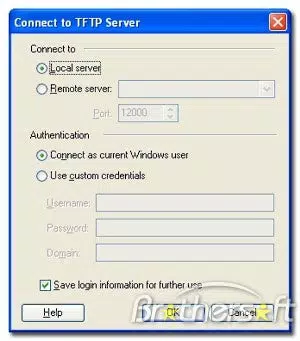
The user interface of WinAgents TFTP Server is minimalistic and focused on functionality rather than visual flair. It is designed for system administrators who prioritize efficiency over aesthetics. Navigation is straightforward, with essential controls accessible through a simple dashboard. The layout is intuitive, allowing users to manage file transfers, access logs, and adjust server settings with minimal clicks.
As a Windows service, the application runs without a visible interface during normal operation, which enhances system stability and reduces resource consumption. Users can access the server configuration through a dedicated management console when needed. Although the developer did not list formal performance metrics, the server is described as optimized for high-load environments, suggesting consistent responsiveness under sustained usage.
Performance is expected to be stable across various Windows device categories, including desktops and servers. Responsiveness during file transfers is likely to be efficient, given the server’s design for continuous operation. Stability is further supported by its service-based architecture, which minimizes crashes and unexpected shutdowns. The lack of a mobile interface or cloud integration reflects its targeted use in on-premise, Windows-centric IT operations.
Platform Compatibility & Technical Requirements
WinAgents TFTP Server is exclusively available for the Windows platform. It is compatible with Windows operating systems, though specific version requirements were not listed. The application has a file size of 1.9 MB, indicating a lightweight footprint that does not impose significant storage demands.
Given its release date in 2012, the software may require compatibility mode or specific system configurations to run on newer Windows versions. However, the developer did not specify minimum OS requirements or hardware specifications. The absence of detailed technical requirements means users should proceed with caution and verify compatibility with their existing infrastructure before installation.
It is important to note that the application is not available for Android, iOS, or other mobile platforms. This limits its use to desktop and server environments where Windows is the primary operating system.
Pros and Cons
Pros
- Designed for continuous, uninterrupted operation in 24/7 environments.
- Runs as a Windows service, minimizing user interaction and system overhead.
- Optimized for high-load performance and stability.
- Supports diverse file types for flexible use in network and system administration.
- Simple setup and configuration process suitable for non-expert users.
Cons
- Release date is from 2012, which may raise concerns about modern compatibility.
- Specific OS version requirements were not disclosed.
- Not available for mobile or non-Windows platforms.
- Limited visual interface; may not appeal to users seeking modern UX design.
- Price point of $49.95 may be considered high for a niche utility tool.
FAQ
Is WinAgents TFTP Server compatible with Windows 11?
The developer did not specify compatibility with Windows 11. Users should test the application in their environment to confirm functionality.
Can I use this server for firmware updates on network devices?
Yes, the server is designed to support firmware updates, making it suitable for deploying flash images to routers, switches, and other network hardware.
Is the application secure for use in enterprise environments?
While the application supports secure file transfers via TFTP, users should implement additional security measures such as network segmentation and access control to protect sensitive data.
Does the server support automatic backups?
Yes, the server can be configured to handle scheduled file transfers, enabling automated backups of device configurations and other critical files.
Are there regular updates available for WinAgents TFTP Server?
The developer did not provide information on update frequency or support lifecycle. Users should verify current availability and compatibility with their systems.
Final Thoughts
WinAgents TFTP Server remains a dependable utility tool for IT professionals managing network infrastructure on Windows platforms. Its ability to run continuously as a background service, combined with its load-resistant design, makes it a solid choice for system administrators requiring reliable file transfer capabilities. While its release date suggests it is an older application, its focused functionality and straightforward setup continue to serve niche but critical needs in network management and device configuration.
It is best suited for organizations with established Windows-based environments that rely on TFTP for automation, backups, and firmware deployment. The lack of mobile support and modern UI elements may be drawbacks for some users, but the tool’s core performance and stability outweigh these limitations in its target use cases.
For professionals seeking a lightweight, dedicated TFTP server for system administration tasks, WinAgents TFTP Server offers a practical solution. Download WinAgents TFTP Server now


